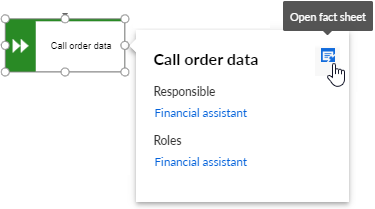
Customize mini fact sheets
You can configure mini fact sheets for objects globally. All global settings for mini fact sheets can be overwritten for single types by the fact sheet settings.
You can configure mini fact sheets for objects globally. All global settings for mini fact sheets can be overwritten for single types by the fact sheet settings.
Prerequisite
You have created your own modification set.
You have the Portal administrator function privilege.
Click
 Application launcher >
  Administration.
  Configuration is displayed.
Click Publication settings > Manage configuration sets. All available configuration and modification sets are displayed. You can edit the modification sets.
Click
 Edit in the row of the relevant modification set.
Click Components on the Define modification set page.
Click
Edit in the Mini fact sheets row. The Mini fact sheets page is displayed.Configure the display options and the properties.
Click
 Back. The Configuration and modification sets page is displayed.
You have configured the mini fact sheets for objects globally.
To display ARIS with this modification set, select the new modification set for display.
You can specify the items for which mini fact sheets should be displayed globally.
Prerequisite
You have created your own modification set.
You have the Portal administrator function privilege.
Click
Application launcher > Administration. Configuration is displayed.Click Publication settings > Manage configuration sets. All available configuration and modification sets are displayed. You can edit the modification sets.
Click
Edit in the row of the relevant modification set.Click Components on the Define modification set page.
Click
Edit in the Mini fact sheets row. The Mini fact sheets page is displayed.Click in the field that contains the items for which mini fact sheets should be displayed. Enter the name of the item you want to add and click Return.
Click
 Delete on the item you want to remove.
Click
Back. The Configuration and modification sets page is displayed.
You have customized the white list for mini fact sheets globally.
To display ARIS with this modification set, select the new modification set for display.
You can specify the default templates and properties of the mini fact sheets globally.
Prerequisite
You have created your own modification set.
You have the Portal administrator function privilege.
You have specified a white list for the mini fact sheet.
Click
Application launcher > Administration. Configuration is displayed.Click Publication settings > Manage configuration sets. All available configuration and modification sets are displayed. You can edit the modification sets.
Click
Edit in the row of the relevant modification set.Click Components on the Define modification set page.
Click
Edit in the Mini fact sheets row. The Mini fact sheets page is displayed.Select a custom layout. If you keep the System layout, the properties cannot be changed.
Move the mouse pointer over the relevant property and click
Edit.Select a custom property template. If you keep the System template, the properties cannot be changed. The properties displayed belong to item type Default object.
To add a new property, click Add.
To add a new property group, click Add group. The Select group property template page is displayed.
Adjust your settings. Click
Back. The Configuration and modification sets page is displayed.Click
Back. The Configuration and modification sets page is displayed.
You have customized the display options and properties globally.
To display ARIS with this modification set, select the new modification set for display.
You can change the order of the mini fact sheets globally.
Prerequisite
You have created your own modification set.
You have the Portal administrator function privilege.
Click
Application launcher > Administration. Configuration is displayed.Click Publication settings > Manage configuration sets. All available configuration and modification sets are displayed. You can edit the modification sets.
Click
Edit in the row of the relevant modification set.Click Components on the Define modification set page.
Click
Edit in the Mini fact sheets row. The Mini fact sheets page is displayed.Select a custom layout. If you keep the System layout, the properties cannot be changed.
Move the mouse cursor over the property you want to move.
If you want to change the order of a property, click
 Up or
Up or  Down.
Down.If you want to move a property to the top, click
 Top.
Top.Click
Back. The Configuration and modification sets page is displayed.
You have changed the order of the mini fact sheets globally.
To display ARIS with this modification set, select the new modification set for display.
You can delete a mini fact sheet.
Prerequisite
You have created your own modification set.
You have the Portal administrator function privilege.
Click
Application launcher > Administration. Configuration is displayed.Click Publication settings > Manage configuration sets. All available configuration and modification sets are displayed. You can edit the modification sets.
Click
Edit in the row of the relevant modification set.Click Components on the Define modification set page.
Click
Edit in the Mini fact sheets row. The Mini fact sheets page is displayed.Select a custom layout. If you keep the System layout, the properties cannot be changed.
Move the mouse cursor over the property you want to delete.
Click
 Delete.
Click
Back. The Configuration and modification sets page is displayed.
You have deleted a mini fact sheet.
To display ARIS with this modification set, select the new modification set for display.
You can enable and customize mini fact sheets for objects. If you hover over an object on the Diagram fact sheet, they are displayed.