Specify a form
A trigger is the event that starts a workflow. For an e-mail flow you select Manual as trigger type, which means that the workflow needs to be initiated by a user. As you want to share a link to a model, you choose a model as the context.
You also need to create the form that opens when you run the flow. The information you provide in the form is included in the predefined e-mail.
In the flow, click the trigger. The Trigger configuration panel opens.
In the Form section, click Add form and select Open form builder. The form builder opens and you can add the elements that you want to use in the form.
Click the Header area. The Properties panel opens.
Enter a name for the form, for example, Share content.
In the Add widgets panel, click
 Users and groups to add the widget to the form body. With this widget you select the recipients of the e-mail when you start the flow.
In the Properties panel, label the widget Recipients and enable the Required toggle.
Add a Text field widget to the form's body, label it Subject, and enable the Required toggle.
Add a Text area widget to the form's body and label it Comment.
Add a Check box widget to the form's body and label it Send copy to me.
Click
 Save. Your form now looks as follows: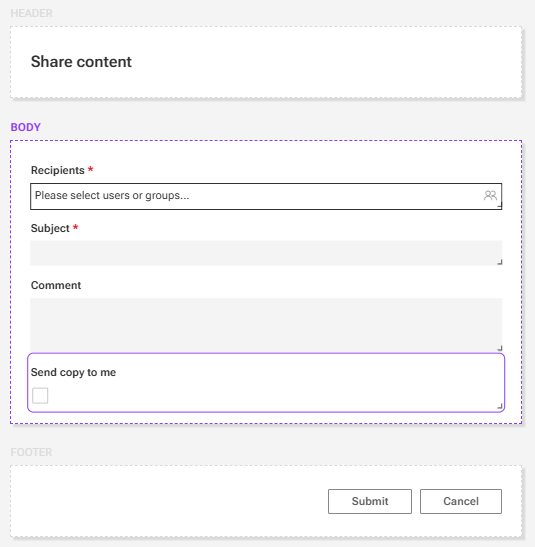
Close the form builder.
Next, you need to select the first action of the flow.