Create and prepare database
To roll out a master model, you must create a database with the appropriate settings.
Prerequisite
You are logged in as a system user.
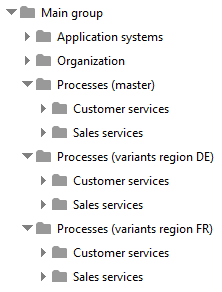
Create a versionable database and the database structure. You can find an example of a database structure below.
Make sure that the method filter of the database contains the Person responsible attribute.
Create the user groups Variant owners and Master owners.
Create users as master owners and variant owners.
Assign the master owners to the Master owners user group and the variant owners to the Variant owners user group.
Assign ARIS Connect Designer license privilege to the user groups.
Assign the Database management and Variant management privileges to the Master owners user group.
Assign the Variant management function privilege to the Variant owners user group.
Assign the Read + Write + Delete + Version (rwdv) access privilege for the master and the subordinated database groups to the Master owners user group. This allows the assigned master owners to create the master model and save objects in the exclusion groups and to reuse them.
Assign Read (r---) access privilege for the variants and the subordinated database groups to the Master owners user group. This allows master owners to open model variants in read-only mode to check what adjustments have been made.
Assign Read (r---) access privileges for the master and the subordinated database groups to the Variant owners user group. This allows assigned variant owners to create the model variants from the master model and to reuse the objects stored in the exclusion groups.
Assign the Read + Write + Delete + Version (rwdv) access privilege for the variant and the subordinated database groups to the Variant owners user group. This allows the assigned variant owners to create the model variants from the master model and to reuse and version the objects stored in the exclusion groups.
Assign the Read + Write + Delete access privileges to the variant owners for their respective regional groups.
The database is prepared for variant management.
Make sure that the master and variant owners have an e-mail address, as the system automatically sends status changes by e-mail.
The database structure for enhanced variant management depends on the conventions used in your organization for ARIS data. The following structure is an example that you can adapt to the conventions in your organization. Create groups for the master models and for each area or region in your database (variants). You should also create groups for the objects you want to exclude from variant creation, such as application systems and organization.
Next step: Enable enhanced variant management