Handling of BPMN elements
Here, the handling of BPMN elements is described.
Since the types of connections that may be used in BPMN diagrams are subject to certain constraints, only allowed connections or connections that have not already been automatically created are offered for selection.
The dialog for selecting connections for an object within another object is only displayed if more than one connection is available for selection.
If there is only one possible connection, it is used.
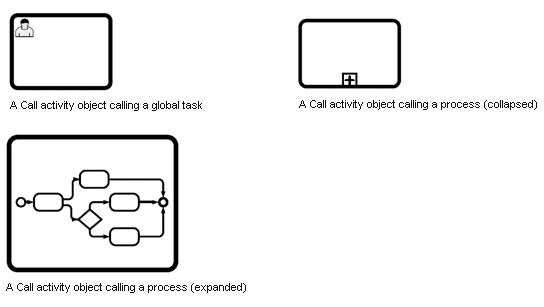
The concept of the activity of the Call activity type is an approach for reusable processes and tasks. An activity of the Call Activity type serves as a wrapper for a global task or process. This wrapper can remove the properties and attributes of the global task.
In ARIS, an activity of the Call activity type is a separate symbol that can be placed directly. An object definition or model that represents the global task or process can be assigned to this activity.
In ARIS, the reference of an activity of the Call activity type is mapped to its global task via a connection between the object definition of the activity of the Call activity type and the object definition of the global task. In addition, the associated target object cannot have any object occurrences.
Both the connection and associated target object are protected when a database is reorganized.
In ARIS, the referenced process is assigned as a model of the BPMN collaboration diagram (BPMN 2.0) type to the activity of the Call activity type.
When you collapse an object of the Call activity type a model of the BPMN collaboration diagram (BPMN 2.0) type is created.
If you want to create an assignment to a model of the BPMN process diagram (BPMN 2.0) type, you must create an assignment manually. Only models of the BPMN collaboration diagram (BPMN 2.0) type are offered in the dialog for selecting a global reference.
If only one assigned model exists, the objects of the assigned model are displayed in the object of the Call activity type when an object of the Call activity type is expanded.
If an assigned model of the BPMN collaboration diagram (BPMN 2.0) type exists, as well as an assigned model of the BPMN process diagram (BPMN 2.0) type, the objects of the assigned model of the BPMN collaboration diagram (BPMN 2.0) type are displayed when an object of the Call activity type is expanded.
Elements are assigned to a process via a connection of the belongs to type. A process is represented by an object of the Pool or Lane type.
The figure shows a group object.
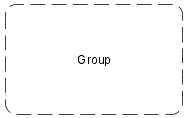
If the group is arranged in an object of the Pool or Lane type, an element that belongs to this group has at least two connections of the belongs to type. An element has connections of the belongs to type to each group to which it belongs and also a connection of the belongs to type to the object of the Pool, Lane, or Subprocess type to which it belongs.
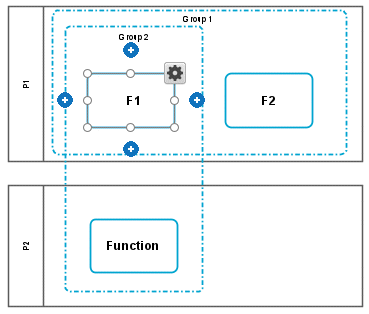
Move
If the process is moved, all of the elements that are linked via a connection of the belongs to type are also moved.
In a BPMN diagram, you can create visual groups that do not have any syntactic meaning. They are for arrangement purposes only. Elements that belong to this group object are linked with this group via an invisible connection of the belongs to type. In this case, there is no embedded relationship between the BPMN element and the group.
The connection of the belongs to type is automatically created if an element is moved to a group.
If the group is moved, the elements linked to the group via a connection of the belongs to type are not moved. If you move the group so that it no longer encloses its elements, the connection of the belongs to type between the group and the elements is automatically removed.
Delete
If a group is deleted, the elements remain. However, if a pool is deleted, all of the elements in the pool are also deleted.
Copy or cut
When you copy or cut the group, its elements are not copied or cut.
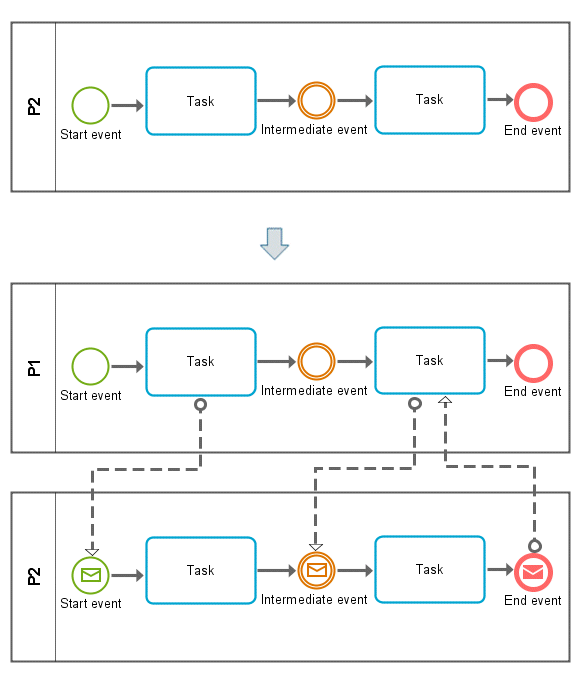
Events that have an incoming or outgoing connection of the Message flow type are considered to be events of the Message type. Events of the Message type have special symbols:
Symbol | Name |
|---|---|
 | Message (start event) |
 | Message (intermediate event) |
 | Message (end event) |
The symbols for objects that do not have any particular semantics (None event type) are automatically adjusted depending on whether a connection of the Message flow type is added or removed.
The graphic shows how the symbols change if you add a connection of the Message flow type.
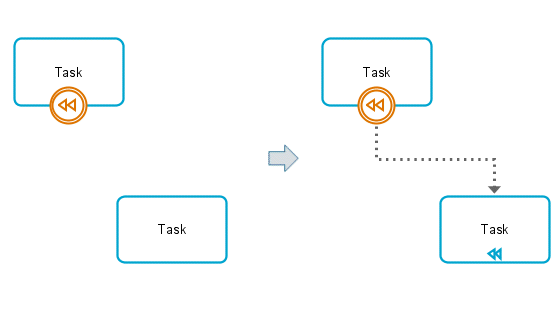
The following graphic shows how the symbol changes if you place an element of the Compensation (intermediate event) type on an activity and draw a connection to another activity.
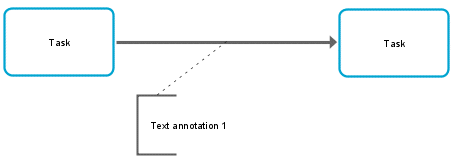
In ARIS, you cannot model a connection to or from a connection. ARIS Method uses a fixed set of attributes of the Annotation type to represent such a construct at ARIS connection definitions. They are placed in the model using the symbol for the Annotation type from the Symbols bar.
The most important object types with their default symbols and a reduced set of connections are available in diagrams of type Enterprise BPMN diagram and Enterprise BPMN process diagram.
Cluster
Control
Risk
Role
Internal person
Entity type
D attribute (ERM)
Document
Location
Application system type
Position
Organizational unit
Organizational unit type
Group
The BPMN specification defines a set of semantic objects that can be placed in a BPMN diagram. Each of these objects can define different attributes. All objects/attributes can be considered in their entirety as a BPMN metamodel.
An application supporting BPMN must provide methods enabling the use of the BPMN attributes that you must specify.
The BPMN specification does not define the way an application makes these mechanisms available. Instead, the application design determines how non-graphic BPMN attributes are modeled.
The following section describes how the BPMN specification is implemented in ARIS.
An exact ARIS representation is described for each BPMN attribute. This enables the ARIS user to:
Model the entire BPMN semantics in ARIS
Determine the exact semantics of a BPMN diagram saved in the ARIS repository.
Use a report to transform BPMN diagrams into BPMN XML.
Use an ARIS report to export BPMN diagrams/metamodels into an independent format.
In some situations, BPMN attributes are mapped to extended ARIS modeling techniques. In particular, different BPMN-semantic definitions, represented as BPMN attributes, are mapped to one or more of the following ARIS concepts:
ARIS connection with special semantics (for example, definition of properties, assignment of properties)
Several occurrences of the same ARIS object definition (for example, events of the Link type, referenced subprocesses, etc.)
Model assignments (for example, during independent modeling of a subprocess)
The following diagram types exist for BPMN in ARIS:
BPMN process diagram (BPMN 2.0) - API name: MT_BPMN_PROCESS_DIAGRAM
BPMN collaboration diagram (BPMN 2.0) - API name: MT_BPMN_COLLABORATION_DIAGRAM
BPMN conversation diagram (BPMN 2.0) - API name: MT_BPMN_CONVERSATION_DIAGRAM
BPMN allocation diagram (BPMN 2.0) - API name: MT_BPMN_ALLOCATION_DIAGRAM
Enterprise BPMN collaboration diagram - API name MT_ENTERPRISE_BPMN_COLLABORATION
Enterprise BPMN process diagram - API name MT_ENTERPRISE_BPMN_PROCESS
The five basic categories of elements are:
Flow objects
Data
Connecting objects
Swimlanes
Artifacts
Flow Objects are the main graphical elements to define the behavior of a business process. There are three flow objects:
Events
Activities
Gateways
Data is represented with four elements:
Data objects
Data inputs
Data outputs
Data stores
There are four ways of connecting the flow objects to each other or other information. There are four connecting objects:
Sequence flow
Message flow
Associations
Data associations
There are two ways of grouping the primary modeling elements through swimlanes:
Pools
Lanes
Artifacts are used to provide additional information about the process. There are two standardized artifacts
Group
Text annotation
Only the base symbols are displayed in the Symbols bar. When you place a base symbol, all of the symbols allowed by the method are offered to you for selection.
If there are symbols allowed by the method whose base symbol is not allowed by the method, the first permitted symbol is displayed, and when this symbol is placed, all other symbols allowed by the method are displayed.
You can import and export data using ARIS.